Subscribe now!
Build agile business processes and transform your organization with @Microsoft solutions. Discover how you can get started today. Subscribe to ensure you won’t miss the latest updates and news.
Full-Time IT at a Fraction of the Cost

Build agile business processes and transform your organization with @Microsoft solutions. Discover how you can get started today. Subscribe to ensure you won’t miss the latest updates and news.
Do you know the four key areas of intelligent security? First, secure the front door by offering protection from identity-driven breaches, email attachments, and attacks targeting the OS. Click here to learn more about the other three areas and how to protect them, with @Microsoft Advanced Threat Protection.

#Dynamics365 enables companies to keep up with digital sales, including @Microsoft itself. Learn how the Digital Sales team at Microsoft leverages #AI-driven solutions to accelerate sales, work together while apart, and adjust to every situation.
Interest in Zero Trust is growing because as organizations acquire more valuable data, they know they have a responsibility to protect it. It takes time and effort to deploy a Zero Trust model—here are 10 solid tips to help you get started.

How do you build creativity in your team? See how entrepreneur and author Scott Duffy inspires experimentation and creates comfort around risk.
Unlock creativity and foster a learning and knowledge sharing #culture with Microsoft Teams and support from Affordable IT.
Learn why you’ll have the best work collaboration with @Microsoft Teams Meetings and Calling. This video shows you all the features you need to bring your team together:
The number of organizations using cloud services continues to increase—up to 94% in today’s world. @Microsoft Zero Trust approach provides continuous verification across your entire digital estate. This document outlines the steps of the Zero Trust journey. Contact Affordable IT for more information.
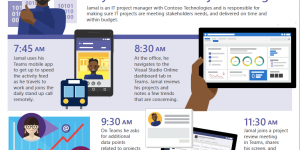
A day in the life – IT project manager with Microsoft Teams. Jamal uses the built-in apps and tabs to monitor projects and mitigate risks. Modernize your business processes and supercharge your team with technology that unlocks creativity.
Talk with Affordable IT to learn more.

For Czech company #ComAp, the effort to be always there for its customers has become one of the company’s essential values. Learn how digitalization of sales has enabled global consolidation and consistency throughout their offices with this short video:
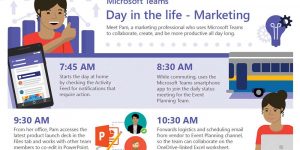
You need a secure location to bring together everything your team needs to be productive–chats, calls, meetings, apps, and more. Microsoft Teams pulls together all the collaboration tools you need, right within the interface. That includes easy access to outside tools like social media. Find out how that makes the day for a marketer like Pam a lot easier!